Yasir
✓
and — people purchased


Days
Hours
Min
Sec
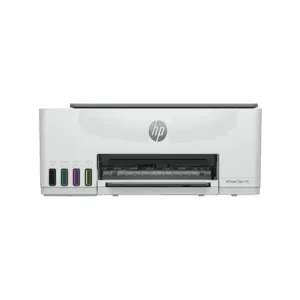
Brand: HP
Series: HP Smart Tank
Model: 580 All-in-One (1F3Y2A)
Color: White
Recommended For: Businesses,
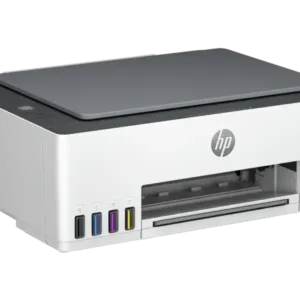
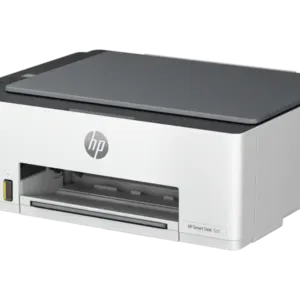
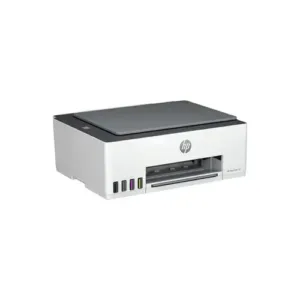
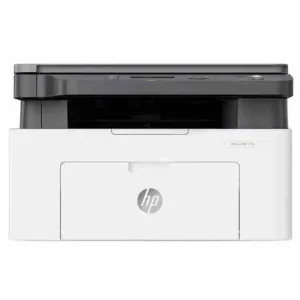
The HP Smart Tank 580 All-in-One Printer combines the functionality of a multifunction printer with the efficiency of a smart tank system, making it an ideal choice for high-volume printing. It delivers up to 18,000 black pages or 6,000 color pages per ink refill, ensuring cost-effectiveness. As for the HP printer price in Pakistan, the Smart Tank 580 is competitively priced.
Share to your buddy !
| Feature | Specification |
HP Smart Tank 580 All-in-One Printer (1F3Y2A) |
|
| Functions |
Print, copy, scan |
| Print speed black (ISO) | Up to 12 ppm 1 |
| Print speed black (draft, A4) | Up to 22 ppm 1 |
| Print speed black (ISO, A4) | Up to 12 ppm 1 |
| Print Speed Color (ISO) | Up to 5 ppm 1 |
| Print speed color (draft, A4) | Up to 16 ppm 1 |
| Print Speed Color (ISO) | Up to 5 ppm 1 |
| First page out black (letter, ready) | (For details see: http://www.hp.com/go/printerclaims) |
| First page out black (A4, ready) | As fast as 14 sec (For details see: http://www.hp.com/go/printerclaims) |
| First page out color (letter, ready) | (For details see: http://www.hp.com/go/printerclaims) |
| First page out color (A4, ready) | As fast as 21 seconds (For details see: http://www.hp.com/go/printerclaims) |
| Duplex printing | Manual (driver support provided) |
| Duty cycle (monthly, letter) | Up to 3,000 pages up to 3,000 pages |
| Duty cycle (monthly, A4) | Up to 3,000 pages |
| Recommended monthly page volume | 400 to 800 |
| Print quality black (best) | Up to 1200 x 1200 rendered dpi |
| Print quality color (best) | Up to 4800 x 1200 optimized dpi color (when printing from a computer and 1200 input dpi) |
| Print languages | HP PCL 3 GUI; HP PCLm (HP Apps/UPD); URF (AirPrint) |
| Print technology | HP Thermal Inkjet |
| Connectivity, standard | 1 Hi-Speed USB 2.0 (device); 1 Wi-Fi 802.11b/g/n; 1 Wi-Fi Direct |
| Mobile printing capability | HP Smart app; Apple AirPrint; Mopria Print Service; HP Print Service Plugin (Android printing); Wi-Fi Direct Printing 2 |
| Network capabilities | Yes (via WiFi) |
| Wireless capability | Yes, built-in Wi-Fi 2.4G, Wi-Fi Direct |
| Wireless technologies | 802.11b/g/n |
| Minimum System Requirements for Macintosh | Apple® macOS v10.15 Catalina, macOS v11 Big Sur, macOS v12 Monterey; 2 GB HD; Internet required |
| Minimum System Requirements | Microsoft® Windows® 11, 10; Internet connection, Microsoft® Internet Explorer or Edge. |
| Digital sending standard features | Scan to file (from software); HP Smart Tasks |
| Display | 33 segments + 1.2-inch iCON LCD Display |
| Processor speed | 980 MHz |
| Maximum Memory | 64MB |
| Memory | 64 MB Integrated DDR1 |
| Compatible Operating Systems | Windows 11; Windows 10; macOS 10.15 Catalina; macOS 11 Big Sur; macOS 12 Monterey; macOS 13 Ventura; macOS 14 Sonoma (Microsoft Windows 11, 10; macOS v10.15 Catalina, macOS v11 Big Sur, macOS v12 Monterey; macOS v13 Ventura; macOS v14 Sonoma; Android; iOS) |
| Paper handling input, standard | 100-sheet input tray |
| Paper handling output, standard | 30-sheet output tray |
| Finished output handling | Sheetfed |
| Media types | Plain paper, Matte Brochure Papers, Glossy Brochure Papers, Photo papers, Envelopes, Other specialty inkjet papers |
| Media sizes supported | A4; B5; A6; DL envelope, Legal |
| Media sizes, custom | 88.9 x 127 to 215.9 x 355.6 mm |
| Borderless printing | Yes (up to 8.5 x 11 in, 210 x 297 mm) |
| Media weight, recommended | 75 g/m² |
| File Format Supported | JPG; PDF |
| Scanner type | Flatbed only |
| Scan file format | JPG; PDF; PNG; TIFF; HEIF |
| Enhanced scanning resolution | Up to 1200 dpi |
| Scan resolution, optical | Up to 1200 dpi |
| Scan size, maximum | 216 x 297 mm |
| Scan technology | Contact Image Sensor (CIS) |
| Copy speed black (ISO) | Up to 10 cpm 3 |
| Copy speed color (ISO) | Up to 2 cpm 3 |
| Copy resolution (black text) | Up to 600 dpi |
| Copy resolution (color text and graphics) | Up to 600 x 600 dpi |
| Copy resolution (black graphics) | Up to 600 dpi |
| Copies, maximum | Up to 99 copies |
| Copy reduce/enlarge settings | Via the HP Smart app |
| Copier settings | Number of Copies, Resize, Quality, Lighter/Darker, Papersize, Papertype, ID Copy, Enhancement |
| Power consumption | 0.109 watts (manual-Off), 3.023 watts (ready), 1.096 watts (sleep) 4 |
| Power | Input voltage 100 to 240 VAC (+/- 10%), 50/60 Hz (+/- 3 Hz). High voltage: Input voltage 200 to 240 VAC (+/- 10%), 50/60 Hz (+/- 3Hz) |
| Operating humidity range | 15 to 80% RH (non-condensing) |
| Recommended operating humidity range | 20 to 80% RH |
| Non-Operating Humidity Range | 5 to 90% RH (non-condensing) |
| Operating temperature range | 5 to 40°C |
| Operating temperature range | 41 to 104°F |
| Energy savings feature technology | HP Auto-Off Technology |
| Energy star certified | No |
| Safety | IEC 60950-1 & IEC62368-1 compliant; EU RED and EN 60950-1 & EN 62368-1 compliant; Singapore Safety; China CCC; Taiwan BSMI |
| Security management | No |
| Minimum dimensions (W x D x H) | 434.66 x 361.53 x 157.26 mm 5 |
| Maximum dimensions (W x D x H) | 434.66 x 580.65 x 259.37 mm 5 |
| Weight | 5.03 kg |
| Product Color | Light basalt |
| What’s in the box | HP Smart Tank 580 All-in-One Printer; 3 x HP GT53XL 135-ml Black Original Ink Bottle (1VV24A); HP GT52 50-ml Cyan Original Ink Bottle (6ZE03A); HP GT52 50-ml Magenta Original Ink Bottle (6ZE04A); HP GT52 50-ml Yellow Original Ink Bottle (6ZE05A); HP Black Original Printhead (M0H50A); HP Tri-Color Original Printhead (6ZA18AE); Setup Guide; Reference Guide; Ink Caution flyer; Regulatory flyer; Warranty flyer; Power Cord; For more information about fill and yield, see https://www.hp.com/go/learnaboutsupplies |
| Number of print cartridges | 4 (1 each black bottle, set of 3 color bottles) |
| Replacement cartridges | North America: HP GT53 90-ml Black Original Ink Bottle 1VV22AA; HP GT53XL 135-ml Black Original Ink Bottle 1VV21AA; HP GT52 Cyan Original Ink Bottle M0H54AA; HP GT52 Magenta Original Ink Bottle M0H55AA; HP GT52 Yellow Original Ink Bottle M0H56AA; Europe the Middle East and Africa: HP GT53XL 135-ml Black Original Ink Bottle 1VV21AE; HP GT52 Cyan Original Ink Bottle M0H54AE; HP GT52 Magenta Original Ink Bottle M0H55AE; HP GT52 Yellow Original Ink Bottle M0H56AE; Asia Pacific: HP GT53 90-ml Black Original Ink Bottle 1VV22AA; HP GT53XL 135-ml Black Original Ink Bottle 1VV21AA; HP GT52 Cyan Original Ink Bottle M0H54AA; HP GT52 Magenta Original Ink Bottle M0H55AA; HP GT52 Yellow Original Ink Bottle M0H56AA; Latin America: HP GT53 90-ml Black Original Ink Bottle 1VV22AL; HP GT52 Cyan Original Ink Bottle M0H54AL; HP GT52 Magenta Original Ink Bottle M0H55AL; HP GT52 Yellow Original Ink Bottle M0H56AL; HP GT52 3-pack Cyan/Magenta/Yellow Original Ink Bottles X4E44AL. For more information about fill and yield, see http://www.hp.com/go/learnaboutsupplies. (Black and composite color average per bottle (cyan/magenta/yellow) results based on HP methodology from the simulation of continuous printing of ISO/IEC 24712 test pages. Not based on the ISO/IEC 24711 test process. An additional black ink bottle is required to print 8,000 color test pages. Actual yield varies based on the content of printed pages and other factors. Some ink from the included bottles is used to start up the printer. For more information about fill and yield, see http://www.hp.com/go/learnaboutsupplies .) |
| Manufacturer Warranty | One-year or 30,000 pages limited hardware warranty, whichever is earlier from the date of purchase and get up to 2 years extended warranty upon registration at https://www.hp.com/go/inkTank-SmartTank-warranty. User-replaceable parts have separate warranty periods. |
Check out the official website of HP for the listed product warranty.
Q: Does the HP Smart Tank 580 support scanning to email?
A: Yes.
Q: How do I put ink in my HP Smart Tank?
A: Easy refills – Included spill-free bottles.
Q: How do I print pictures from my HP Smart Tank?
A: Load photo paper, select an image, and print via the HP Smart App.




Welcome to the Techtrix Store! Pakistan’s trusted source for computers and networking solutions. Explore our extensive range of products from Dell, Lenovo, HP, Tp-Link, Cisco, Asus, Linksys, Deli, and other major global tech brands all offered at competitive prices. As an official TP-Link Partner in Pakistan & Trusted Cisco distributor in Pakistan, we guarantee quality products and exceptional customer service.